
Apr 1, 2026
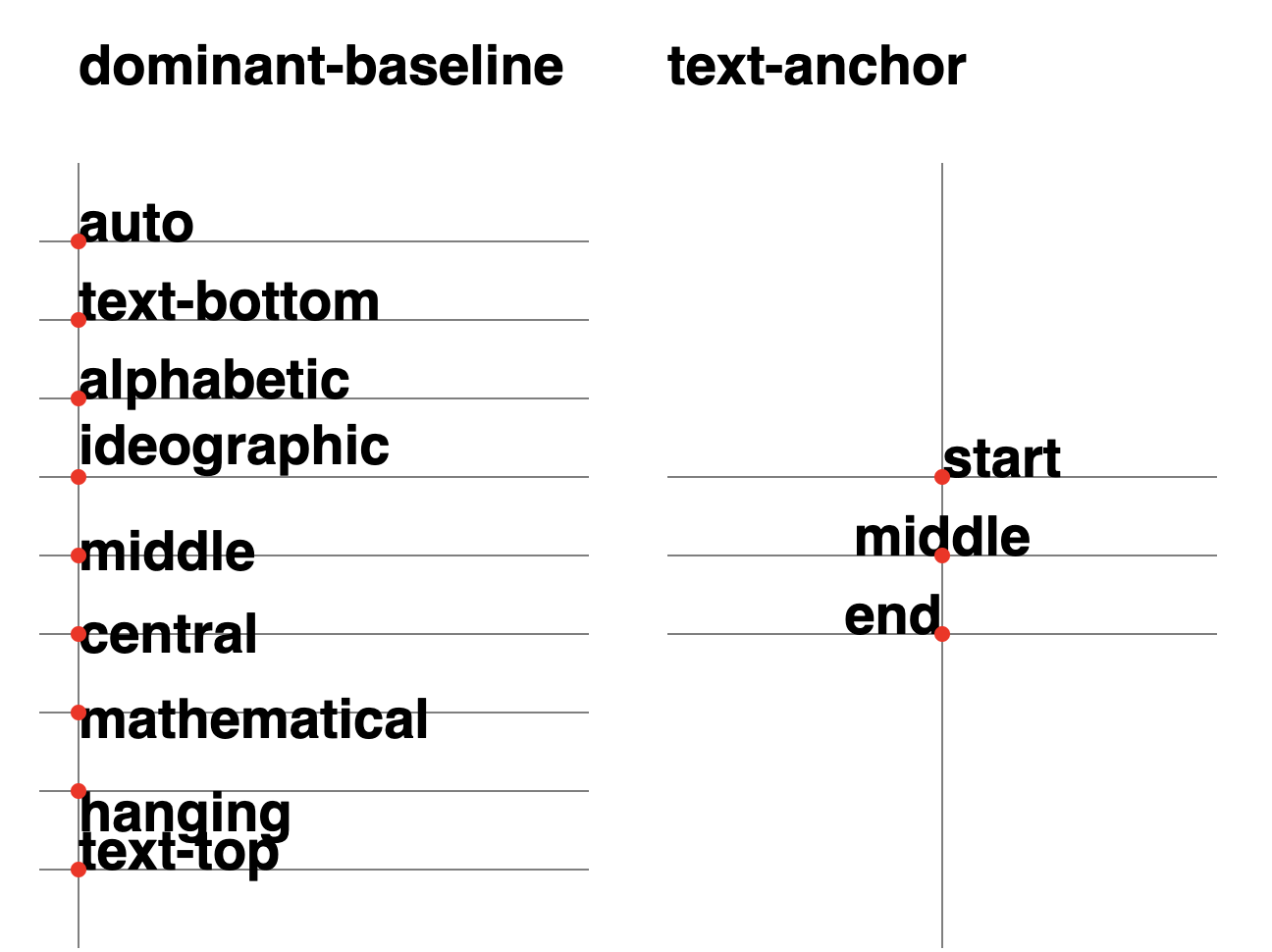
Given that you often want to label an SVG chart, you can set alignment-baseline and text-anchor on a text element to get fine-grained control. Setting both to middle will make the anchor the center of the element. Useful to adjust on charts with spokes such as radar.
<svg height="480" width="640">

  <!-- Dominant Baseline -->
  <line x1="40" x2="40" y1="80" y2="480" />

  <line x1="20" x2="300" y1="120" y2="120" />
  <line x1="20" x2="300" y1="160" y2="160" />
  <line x1="20" x2="300" y1="200" y2="200" />
  <line x1="20" x2="300" y1="240" y2="240" />
  <line x1="20" x2="300" y1="280" y2="280" />
  <line x1="20" x2="300" y1="320" y2="320" />
  <line x1="20" x2="300" y1="360" y2="360" />
  <line x1="20" x2="300" y1="400" y2="400" />
  <line x1="20" x2="300" y1="440" y2="440" />

  <text x="40" y="40">dominant-baseline</text>

  <text x="40" y="120" dominant-baseline="auto">auto</text>
  <text x="40" y="160" dominant-baseline="text-bottom">text-bottom</text>
  <text x="40" y="200" dominant-baseline="alphabetric">alphabetic</text>
  <text x="40" y="240" dominant-baseline="ideographic">ideographic</text>
  <text x="40" y="280" dominant-baseline="middle">middle</text>
  <text x="40" y="320" dominant-baseline="central">central</text>
  <text x="40" y="360" dominant-baseline="mathematical">mathematical</text>
  <text x="40" y="400" dominant-baseline="hanging">hanging</text>
  <text x="40" y="440" dominant-baseline="text-top">text-top</text>

  <circle cx="40" cy="120" r="4" />
  <circle cx="40" cy="160" r="4" />
  <circle cx="40" cy="200" r="4" />
  <circle cx="40" cy="240" r="4" />
  <circle cx="40" cy="280" r="4" />
  <circle cx="40" cy="320" r="4" />
  <circle cx="40" cy="360" r="4" />
  <circle cx="40" cy="400" r="4" />
  <circle cx="40" cy="440" r="4" />

  <!-- Text Anchor -->
  <line x1="480" x2="480" y1="80" y2="480" />

  <line x1="340" x2="620" y1="240" y2="240" />
  <line x1="340" x2="620" y1="280" y2="280" />
  <line x1="340" x2="620" y1="320" y2="320" />

  <text x="340" y="40">text-anchor</text>

  <text x="480" y="240" text-anchor="start">start</text>
  <text x="480" y="280" text-anchor="middle">middle</text>
  <text x="480" y="320" text-anchor="end">end</text>

  <circle cx="480" cy="240" r="4" />
  <circle cx="480" cy="280" r="4" />
  <circle cx="480" cy="320" r="4" />

</svg>